Basics
Apps to install
We recommend installing the following apps:
- Orbot (Google Play link) and Orfox (Google Play link). These two apps together provide anonymous web browsing, something we'll come back to.
- Avast! Mobile Security (Google Play link). This app does antivirus scans on your phone, and can detect dangerous apps on your phone (among other things, most of them useful).
- Fing (Google Play link). Fing monitors what devices are connnected to your Wifi.
- NoRoot Firewall (Google Play link). NoRoot Firewall is an Android firewall. I'll explain what that is in a second.
- Opera Free VPN - Unlimited VPN (Google Play link). Opera Free VPN is a Virtual Private Network, another thing that I'll explain in a second.
Orbot and Orfox work together to keep you safe online. It is possible for websites, and people, to track you online using a variety of tools. Orbot and Orfox are built on Tor, which was designed and built by the US Government to foil tracking tools. Orbot/Orfox also contains a set of privacy protection tools.
Because of those privacy and anti-tracking tools, the Internet will look a little different when you're using Orbot/Orfox. You'll get reCAPTCHAs more often (the things asking you to prove that you're not a robot). Your internet will be slower. Some sites might refuse you access. You'll have to sign into websites more often. It is worth it, in our opinion.
Avast! Mobile Security has a couple of tools that we have found useful in times past. Whenever an app is installed or updated, Avast! will check the app for viruses and let you what it finds. It will also scan your device on a regular basis for viruses, your network for vulnerabilities (weak or no password, out-of-date security, etc.).
Fing is a weird app. Its job is to look at your Wifi network and tell you what is connected to it. This is good for finding things that are connected that you don't want connected, like hidden cameras, audio bugs, stuff like that. It is possible for devices to hide from this app, but it is tricky. I've only ever seem one device that could do it. (If you're curious, it was a base for a home security system.) Basically, just open the app every once in a while, refresh it, and make sure that there's no surprises in the resultant list.
A firewall is a piece of software that regulates internet access. Basically, if you have an app installed, and there's no good reason for it to connect to the Internet, then you can prevent it from accessing the internet. Period. End of discussion. This particular firewall will notify you every time something tries to connect, and ask if you're cool with it. It's pretty cool. Of course, if you say yes, then the firewall will remember that and not ask you again. You can always revoke this permission.
Apps to remove
We recommend removing the following apps:
- Facebook Messenger
- Snapchat
- Pokemon GO
These are all apps that have the ability to publicly post your physical location. Facebook, Facebook Messenger and Twitter can all be accessed online (Messenger requires a little bit of work though; I'll go over that in a separate guide, linked here). They are not as pretty online, but they are functional, and using the online version makes it harder for the websites to grab your location or other personal information without you knowing about it and giving your consent.
Turning Locations Services off
Turning the location service off on your phone makes it much, much more difficult for someone to track your phone. It is still possible, mind you, but it's a lot harder.
Here's how to do it:
- Open your settings app.
- Use the search bar to search for Location.
- Tap the Location search result (there should be one that just says Location).
- In the settings page that pops up, there should be a toggle switch labeled On. Tap it.
- Tap Close in the warning box that pops up.
Turning off location makes maps and driving direction apps (like Google Maps, Waze and MapQuest) completely useless. These apps rely on knowing where you are in order to tell you where to go. It might also mess with other apps you have installed. I don't know.
There is a way to only allow some apps to access your location. It is not as secure as turning the location off for everything. This being said, it's a lot less of a pain.
Putting Tape over your Camera
The title of this section pretty much says it all. Put a piece of tape over your camera. I personally prefer heavy-duty black duct tape, but as long as it's opaque, you're probably fine.
If you're looking for something that's not quite as obvious, you might try nail polish. I haven't tried it personally, but nail polish is pretty opaque, and you should be able to remove it with rubbing alcohol (although, if you think your screen might not be glass, you should probably avoid normal nail polish remover).
Setting Up Notification Privacy
If you configure your notification privacy correctly, you can prevent private content from showing up on your lockscreen. Here's how to do that:
- Open up your settings app.
- Scroll down until you find an entry called "Sound and Notification". Tap on it.
- Scroll down again until you find an entry called "App notifications". Tap on it.
- This will load for a few seconds.
- The list that shows up is a list of all the apps you have installed. Find an app that you want to hide the notifications from, like your texting app or your email. Tap on it.
- Scroll down until you find the option "Hide sensitive content". There will be a toggle next to the option; turn it on.
After doing this, if you get a notification from this app while your phone is locked, it'll look like this:

You can still see which app just sent you that notification, but you can't see what was in that email or text message.
Following is a list of apps that we recommend hiding sensitive content for:
- Any and all texting apps you have installed
- Any and all email apps you have installed.
- Facebook Messenger, if you still have it installed
- Snapchat, again, if you still have it installed
- Any other messaging apps you have installed, including Google Allo, Signal, WhatsApp, ChatSecure, the whole set.
Most of this is common sense, and of course you can adjust things to match what you are comfortable with.
How to change app permissions
Android gives users control over what apps can access certain parts of your phone. For instance, a camera app would need access to the camera, a voice recorder would need access to the microphone, a music app would need access to the files on your device, a web browser needs access to your Wi-Fi and cellular connections, stuff like that.
Here's the thing: a voice recorder doesn't need access to the Internet. A camera (probably) doesn't need Internet access either. An app for taking notes doesn't need access to your camera and microphones. Android uses app permissions to control which apps can access and change things on your phone. This section will show you how to access and control app permissions.
- Open the settings app on your phone.
- Search for Access Permissions. Tap on the entry titled Access Permissions.
- Tap on Access permissions one more time.
- This should open a page. On my device, it looks like this:
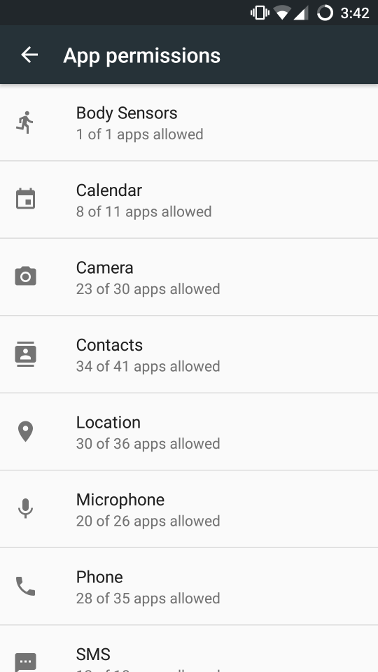
- From here, you can go through the permissions. There's a lot of this where you just have to use your best judgement. Does Google Calendar need access to your calendar? Probably. Does Facebook need access to your calendar? Probably not.
If an app goes to use something, and your app permissions prevent it from doing so, it will complain at you. Depending on how well built the app is, it might ask you to give permission back, or it might just crash. It depends on the app.
How to buy a burner SIM and how to install it
[research required]
Consider: do you need a smartphone at all?
I've spent the last few hundred words talking about all the ways to secure your Android smartphone. Android is a very flexible, configurable operating system. It can run anything from a weather sensor to a web server. Here's the thing: every thing it can do, every capability it has, can be turned into a weapon. Does the benefit of having a smartphone outweigh the risk it carries?
I can't answer this for you. I don't know you, your situation. You will have to make this choice for yourself. If you do decide to stop carrying a smartphone, make sure to turn it off and put it in a safe place. If you don't plan on keeping it, make sure to factory reset your phone before you sell it or throw it away.
Well, what about my Fitbit?
Again, whether or not to continue using a Fitbit or other wearable device is up to you. I don't personally recommend it. A fitness tracker is just that -- a tracker. Using a wearable device takes all of the issues that Android has and adds in any security issues that the wearable itself has.
Again, you will have to make this choice for yourself. I don't personally recommend it.
When a phone is not enough
Public Wi-Fi
Public Wi-Fi is something to be very careful with. The following public Wi-Fi sources are usually safe:
- Wi-Fi at government organizations, such as libraries, public schools and courthouses.
- Corporate public Wi-Fi, such as Wi-Fi at Walmart or Starbucks.
- Public Wi-Fi from small businesses, if you verify the Wi-Fi network name and password with an employee.
If you are using public Wi-Fi, I don't recommend pulling up any kind of personal information (such as bank account information, taxes, pretty much anything on a government website, and so on). The question with public Wi-Fi is not are you being tracked, it's who is tracking you. If you're comfortable with the US Government knowing what you're doing online, then feel free to use Wi-Fi at government organizations.
Also bear in mind that the only reason most entities track people on their Wi-Fi is in case someone tries to do something illegal on their Wi-Fi. If you don't do anything illegal on public Wi-Fi, chances are no-one will ever look at what you were doing.
There is a way to prevent people from tracking you on public Wi-Fi, and that's by using a Virtual Private Network or VPN. I'll talk about that next.
Virtual Private Networks
Virtual Private Networks, or VPNs, are a layer of protection around your web browser. What it is in technical terms is beyond the course of this website. VPNs isolate you from your Wi-Fi network and prevent someone from using your Wi-Fi to figure out where you've been on the Internet. If someone has access to your phone, a VPN will not prevent you from being tracked. A VPN has a simple purpose, and that is to hide where you are going on the Internet from someone who has access to the router you are connected to.
This being said, VPNs are useful. If you are on public Wi-Fi, I highly recommend using one. This gives you the advantage of public Wi-Fi (it's free) without the main disadvantage (the owner of the Wi-Fi knows what you're using it for). There are many VPNs available for public use. I personally recommend using Opera's VPN, which is available for Android and iOS through an app (Android, iOS), and for computers through Opera's browser (here).
VPNs come in two flavors: free and paid. Free VPNs are almost always slower than paid VPNs, but they're free. The choice is yours.
VPNs are generally speaking a good idea, and are a really good idea when you are on public Wi-Fi and/or looking at sensitive population.
Secure computers (and why that's a contradiction)
So here's the thing about computers in general, including smartphones: there is no such thing as total security. Someone with enough money and enough resources theoretically hack into anything they please. This being said, there are some computers and smartphones that are very easy to get into, and some that aren't.
Some computers are better than others
This being said, some computers are much harder to get into than others. Chromebooks and Apple computers are really hard to get into. Linux computers can also be difficult to get into, depending on how they're configured. I personally prefer a Chromebook. They're cheap, lightweight and (mostly) secure.
So basically anything that's not Windows.
Public computers can also be a good alternative to using your own computer. Most public libraries have computers that you can use, and you don't always need a library card. You will need to do the research on that yourself.
If you choose to use public computers, don't make a habit of using the same computer. If you can, don't make a habit of going to the same place to use a computer every time. Change it up.
Other stuff
Prepaid VISA gift cards as debit/credit replacements
Living without a bank